Common wallet setup mistakes
Users can confuse SafePal hardware pairing, mobile app account views, QR signing steps, and imported wallets. Confirm which wallet is active before sending funds.
SafePal combines hardware devices with a mobile-first workflow — useful if you want QR-based signing on select models.

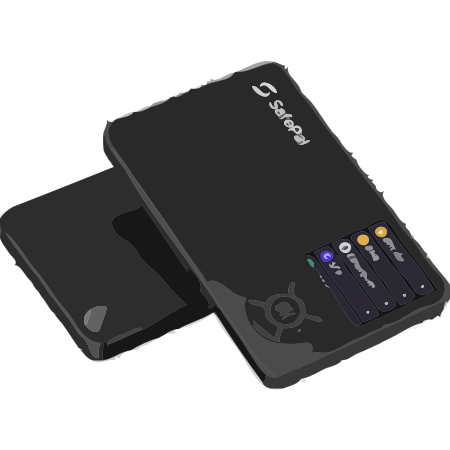
Quick summary
Wallet type
Hardware wallet (mobile-centric ecosystem)
Best for
Users who manage assets heavily from a phone app
Recovery phrase
Yes — treat backup as the root of custody
Storage style
Offline keys on device with app-driven flows
Beginner level
Medium — review QR or cable support steps for your model
Wallet support
Use this structured SafePal wallet support page to narrow setup steps, recovery phrase questions, connection problems, balance display issues, transaction concerns, and official help checks without implying any official affiliation.
SafePal wallet help should start with the exact issue, the SafePal support portal, and the safest next step for a hardware wallet.
Official SafePal accessReport wallet issue
Describe your SafePal setup, recovery, connection, balance, firmware, or wallet access problem.
OpenSafePal support hub
Review setup help, recovery help, troubleshooting checks, and safety notes before taking wallet actions.
OpenSafePal overview
Use the brand root for informational context and navigation before opening support-specific routes.
OpenRecovery phrase safety
Check phrase handling habits before restoring or moving funds.
OpenOfficial SafePal access
Use the verified wallet destination for downloads, firmware, purchases, and brand-owned help after reviewing safety context.
OpenReport wallet issue
Submit a non-secret wallet problem for moderated review and safer routing. PhraseWallet is independent and this is not official wallet support or emergency recovery assistance.
Never enter your recovery phrase, private key, password, PIN, or payment details.
SafePal offers hardware options intended to pair with mobile app experiences. Some setups lean on QR communication so the phone never holds raw signing keys.
Compare SafePal with Ledger and Trezor when evaluating firmware transparency, screen size, and how often you will sign from mobile versus desktop.
Self-custody still depends on your recovery phrase storage and verifying addresses on the trusted device screen. Mobile-first convenience should not skip basic checks: official apps, correct firmware channels, and cautious dapp connections.
If you use a backup card or metal plan, document where materials live and who can access them.
SafePal may be worth considering if its hardware wallet workflow matches how you plan to store, send, and review crypto transactions. Compare it against your budget, supported networks, device habits, and comfort protecting a recovery phrase.
If you are new to self-custody, start with a smaller amount, read the recovery phrase basics, and understand lost phrase risk before relying on any one wallet for meaningful funds.
SafePal can be part of a safer self-custody setup when it is used from the official portal, kept updated through verified channels, and paired with careful recovery phrase storage. The wallet choice matters, but user habits matter just as much.
Never share your recovery phrase, never enter it into support chats or wallet validation pages, and watch for phishing links, fake apps, cloned download pages, and impersonators.
Use the official SafePal website when buying, downloading, installing, updating, or looking for help. For hardware wallets, avoid secondhand or suspiciously discounted devices. For software wallets, avoid unofficial app stores, browser extensions, APK files, and sponsored lookalike pages.
During setup, write the recovery phrase offline, verify the words carefully, and store the backup somewhere private before funding the wallet.
Issue intelligence
These are practical troubleshooting patterns to check before restoring, updating, importing, or contacting support.
Users can confuse SafePal hardware pairing, mobile app account views, QR signing steps, and imported wallets. Confirm which wallet is active before sending funds.
Use only official SafePal update sources. A real update should not ask for seed words in a website, support chat, or validation form.
A token can appear missing when the wrong network, account, token contract, or app view is selected. Check public address and network context before restoring.
Avoid cloned apps, sponsored lookalike pages, fake SafePal support accounts, and remote-access requests during setup or transaction troubleshooting.
Product line
Choose a model page for setup checks, firmware update help, recovery phrase guidance, and wallet access troubleshooting.
SafePal
SafePal S1
Setup, recovery, firmware, and balance help.
Open setup checks, firmware update support, recovery guidance, and balance visibility help.
Device helpSafePal
SafePal X1
Setup, recovery, firmware, and balance help.
Open setup checks, firmware update support, recovery guidance, and balance visibility help.
Device helpSafePal
SafePal S1 Pro
Setup, recovery, firmware, and balance help.
Open setup checks, firmware update support, recovery guidance, and balance visibility help.
Device helpComparison checklist
Evaluate how often you will sign on phone, how QR or Bluetooth behaves, and whether that matches your threat model.
Map the networks and assets you need today (and next year) against the device and app feature set.
Buy from reputable sources, verify packaging, and only install updates from official channels.
Plan offline phrase storage; avoid cloud photos, email drafts, or messengers for seed material.
Ledger vs SafePal and broader hardware help pages help you compare ecosystems, not just device shape.
Think through device replacement, inheritance planning, and how you will test a restore before an emergency.
Compare related help pages before you download or buy.
Read these before setting up or restoring any self-custody wallet.
Use the official SafePal website for buying, downloads, updates, and brand-owned help. Verify the domain before taking wallet actions, and compare category help pages if you are still choosing.
Community reports
SafePal troubleshooting reports often involve mobile app pairing, QR signing, firmware prompts, balance display, recovery planning, and fake support warnings.
These examples are informational and reflect common user-reported wallet issues. Never share your recovery phrase, seed phrase, private keys, PIN, or wallet backup with anyone. Official wallet support should never ask for your recovery phrase.
“SafePal shows an empty or delayed balance after the app or firmware update.”
Users often report temporary balance delays after firmware or app updates until the device reconnects, account discovery runs, and the correct network or token view refreshes.
“The restore finished, but SafePal is showing different addresses or no expected funds.”
Some restores initially show empty wallets until the right account type, passphrase context, derivation path, network, or imported account view is selected.
“SafePal QR pairing stopped working after an app update or reconnect.”
QR-signing problems commonly involve app pairing records, camera focus, unsigned transaction QR content, firmware validation, signed QR broadcast, or a network mismatch.
“A support message said it could fix SafePal if I shared my seed phrase or screen.”
Fake support often appears during update, restore, missing-balance, and QR-signing stress. No legitimate wallet support flow should ask for recovery words, private keys, PINs, or remote access.
Common wallet issues
Use these maintained support paths to move from a symptom to the right setup, recovery, troubleshooting, or security help without sharing private wallet data.
Related problems
If this page is close but not exact, check these nearby support topics so the next step matches the failure pattern.
Check the app, device, extension, account, and backup state before funding or restoring a wallet.
Open helpProtect seed words and only restore inside the intended wallet flow.
Open helpNetwork, account, address, passphrase, and token display settings can make funds look missing.
Open helpAvoid support chats, phone numbers, validators, and remote helpers asking for private wallet data.
Open helpOfficial wallet support should never ask for your recovery phrase, seed phrase, private keys, PIN, wallet backup, screen sharing, or remote access. Verify downloads, QR tools, and update prompts on the official wallet site before acting.
Continue with comparisons and beginner support.
FAQ
Check the selected network, wallet address, token contract, app display settings, and whether the asset is supported in that view before restoring or importing again.
No. Do not share a recovery phrase, private key, PIN, or wallet backup with support chats, websites, DMs, or anyone offering to validate the wallet.
Verify the official update source, device model, battery or connection state, and offline backup readiness. A firmware update should not require entering seed words into a website.
SafePal can be more mobile-centric, and some models use QR or app-driven signing workflows. Compare app pairing, transaction review, and backup steps before funding the wallet.
Compare QR/mobile workflows, backup discipline, and alternatives before you commit.